


Download 1.1.1.1 with WARP – Free DNS Resolver, Secure VPN, Speed Booster
Overview – Why 1.1.1.1 with WARP Stands Out
In a world where every click can be tracked, 1.1.1.1 with WARP offers a rare blend of speed, privacy, and simplicity. Developed by Cloudflare, the same company that powers a large portion of the internet’s backbone, this free security program replaces the default DNS resolver on your device with a modern, encrypted alternative. By routing your DNS queries through Cloudflare’s global network, it prevents malicious actors, ISPs, and even data‑brokers from snooping on the websites you visit.
But the service doesn’t stop at DNS protection. The “WARP” component adds a lightweight VPN‑like tunnel that secures all outbound traffic, giving you a privacy shield that’s far stronger than the traditional wired protocols most routers rely on. Whether you’re on Windows, macOS, Android, or iOS, the app is built to be lightweight, resource‑friendly, and easy to enable with a single toggle.
Users report faster page loads because the resolver contacts the nearest Cloudflare edge node, cutting latency dramatically. While the free tier already delivers a noticeable boost, Cloudflare also offers a premium WARP+ subscription for those who need unlimited data and advanced routing options. In short, 1.1.1.1 with WARP is a privacy‑first, speed‑enhancing tool that works out‑of‑the‑box on both desktop and mobile platforms, making it an essential addition for anyone who values a secure and responsive internet experience.
Key Features that Make 1.1.1.1 with WARP a Must‑Have Tool
- Secure DNS Resolver: Replaces your ISP’s DNS with Cloudflare’s global, encrypted DNS service, preventing DNS hijacking and eavesdropping.
- WARP VPN Tunnel: Provides a lightweight, WireGuard‑based VPN that encrypts all traffic, offering protection similar to a full‑scale VPN but with lower latency.
- Automatic Speed Optimization: Routes queries to the nearest Cloudflare edge node, often delivering faster page loads and lower ping times.
- Family Protection Mode: An optional filter that blocks adult content and known malicious domains, suitable for households with children.
- Cross‑Platform Availability: Native apps for Windows, macOS, Android, and iOS, all sharing a unified, user‑friendly interface.
- Free Tier with No Ads: The core DNS and WARP functionality are completely free, with no intrusive advertising or data collection for marketing.
- WARP+ Premium Option: Subscription‑based upgrade that unlocks unlimited data, priority routing, and customizable network paths for power users.
- Built‑In Diagnostics: DNS logs and connection statistics help users understand performance and troubleshoot issues.
- Lightweight Footprint: Uses minimal CPU and memory, making it ideal for older hardware or devices with limited resources.
Installation & Usage – Getting Started on Every Platform
Desktop (Windows & macOS)
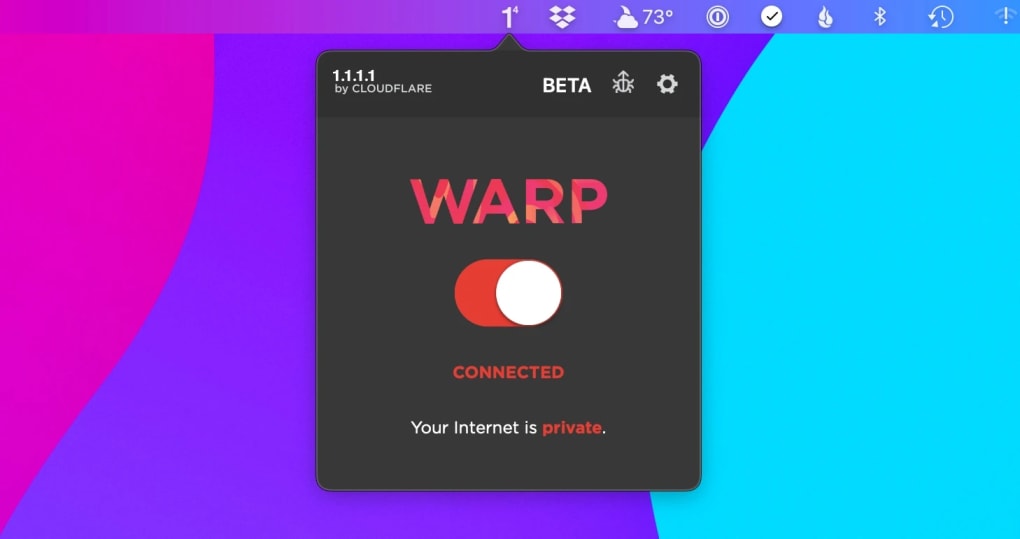
Installing 1.1.1.1 with WARP on a PC or Mac is straightforward. Visit Cloudflare’s official download page, click the Download for Windows or Download for macOS button, and run the installer. The setup wizard walks you through a typical installation with default options, which are recommended for most users.
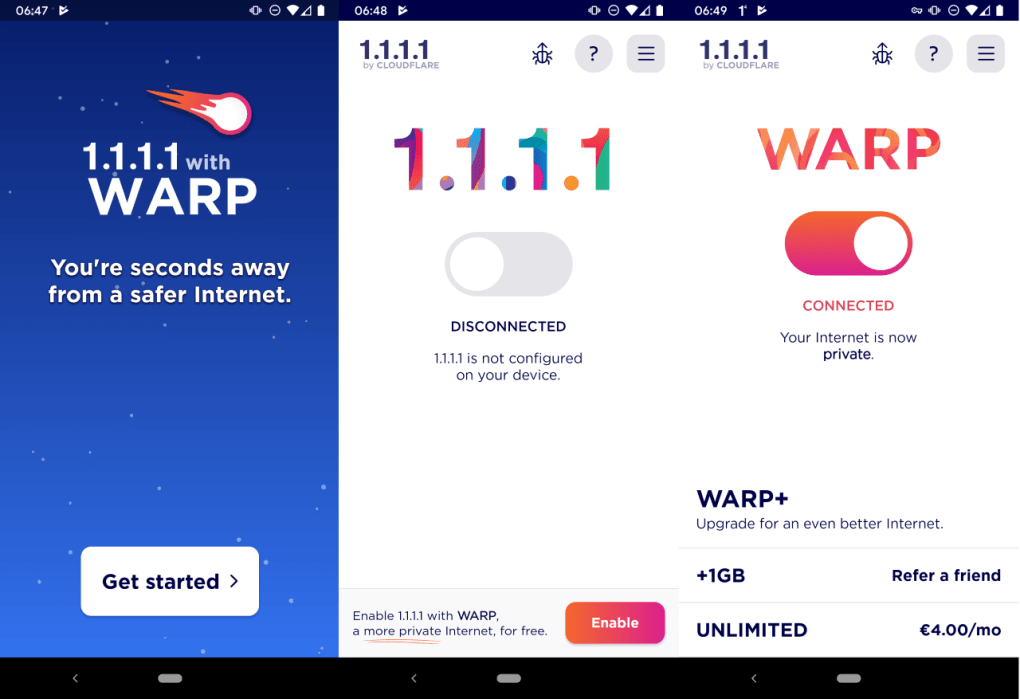
Once installed, launch the application; you’ll see a large toggle button labeled “WARP”. Switching the toggle on activates the VPN tunnel, while leaving it off keeps only the DNS resolver active. To change modes, click the gear icon in the top‑right corner, then select “Mode” and choose between “1.1.1.1 (DNS only)” and “WARP (VPN)”.
The Preferences menu also offers a “Family” option, which you can enable to block adult content.
Mobile (Android & iOS)
Mobile users can download the app directly from Google Play Store or Apple App Store. After installing, open the app and grant the required VPN permissions. A single tap on the large “WARP” button turns the service on. In the Settings menu, you can toggle between “DNS Only” and “WARP”, enable “WARP+” (if you have a subscription), or activate the “Family” filter. The mobile version also includes a quick‑access widget for Android that lets you toggle WARP without opening the full app.
Using WARP+ and Managing Your Subscription
If you decide to upgrade to WARP+, tap the “Upgrade” button in the app’s Settings. Cloudflare offers a free trial for new users, after which you’ll be billed monthly (or annually, if you choose the yearly plan). The premium plan unlocks unlimited data, priority routing, and the ability to select specific exit nodes for optimized performance during peak traffic periods. Note that the desktop version currently does not support WARP+; the premium features are limited to mobile devices at this time.
Overall, the installation process takes under five minutes, and the user interface is designed for people with no technical background. Whether you’re a casual browser or a power user, the app’s toggle‑based design makes enabling privacy and speed a one‑click experience.
Compatibility, Pros & Cons – What to Expect on Your Device
1.1.1.1 with WARP is compatible with the following operating systems:
- Windows 10 and later (64‑bit)
- macOS 10.13 (High Sierra) and later
- Android 5.0 (Lollipop) and later
- iOS 12.0 and later (iPhone, iPad, iPod Touch)
Pros
- Free core service with no ads or data‑selling.
- Improves DNS lookup speed and reduces latency.
- Encrypts all traffic via the WARP tunnel, protecting against eavesdropping.
- Lightweight; minimal impact on battery and CPU.
- Family mode adds an extra layer of content filtering.
- Simple one‑click activation makes it accessible to non‑technical users.
Cons
- WARP+ premium is only available on mobile platforms, not on desktop.
- In some network environments, enabling WARP can slightly reduce speed instead of boosting it.
- Advanced routing options are limited in the free version.
- No built‑in kill‑switch on Windows/macOS (requires third‑party solution for abrupt disconnect protection).
Frequently Asked Questions
Is 1.1.1.1 with WARP really free?
Yes. The core DNS resolver and the WARP VPN tunnel are completely free. Cloudflare only charges for the optional WARP+ premium upgrade, which adds unlimited data and priority routing.
How does WARP differ from a traditional VPN?
WARP uses the WireGuard protocol, which is lighter and faster than most traditional VPNs. It focuses on encrypting traffic while keeping latency low, whereas many VPNs prioritize anonymity over speed. WARP also integrates Cloudflare’s global edge network, giving it a performance advantage.
Can I use WARP on a corporate network?
Most corporate firewalls allow WARP traffic, but some strict environments block the WireGuard ports. If you encounter connection issues, check with your IT department or try the “DNS only” mode, which works without the VPN tunnel.
Does 1.1.1.1 with WARP log my browsing activity?
Cloudflare’s privacy policy states that it does not sell or log personal browsing data from the free tier. WARP+ may collect limited telemetry for performance optimization, but this data is anonymized and not used for advertising.
Why does my internet sometimes feel slower after enabling WARP?
If your ISP already provides a fast, low‑latency connection, the additional encryption step can add a few milliseconds, which may be noticeable on high‑speed links. In most cases, however, the global routing advantage outweighs the overhead.
Conclusion – Should You Download 1.1.1.1 with WARP?
1.1.1.1 with WARP delivers a compelling mix of privacy, speed, and ease of use that is hard to find in a single free tool. By replacing your ISP’s DNS and adding an encrypted tunnel, it shields you from common threats like DNS hijacking, phishing, and ISP profiling, while often making webpages load faster. The app’s minimal footprint ensures it runs silently in the background on Windows, macOS, Android, and iOS, and the one‑click toggle makes it accessible to anyone, regardless of technical skill.
Although the premium WARP+ tier is limited to mobile devices and a few advanced features are missing on desktop, the free version already provides a robust privacy layer without any subscription hassle. If you value a faster, more secure browsing experience and want a solution that works out‑of‑the‑box, downloading 1.1.1.1 with WARP is a smart move. Click the button below to start your free download and enjoy a safer internet today.
Download 1.1.1.1 with WARP now
Overall rating: 4.5/5. The application excels in privacy protection and speed optimization, though the lack of WARP+ on desktop is a minor drawback.







